Configuration
It's important to configure Talawa-Admin. Here's how to do it.
Automated Setup
You can use our interactive setup script for the configuration. Use the following command for the same.
pnpm run setup
All the options in "setup" can be done manually as well and this is covered in a section below.
Manual Setup
The setup script only modifies the most common configuration parameters. This section explains how to manually edit these values.
The .env Configuration File
A file named .env is required in the root directory of talawa-admin for storing environment variables used at runtime. It is not a part of the repo and you will have to create it. For a sample of .env file there is a file named .env.example in the root directory. Create a new .env file by copying the contents of the .env.example into .env file. Use this command:
cp .env.example .env
.env Parameters
This .env file must be populated with the following environment variables for talawa-admin to work:
| Variable | Description |
|---|---|
| PORT | Custom port for Talawa-Admin development purposes |
| USE_DOCKER | Whether you want to use Docker or not |
| DOCKER_MODE | Docker mode: ROOTFUL or ROOTLESS |
| DOCKER_PORT | Port to use when running with Docker |
| REACT_APP_TALAWA_URL | URL endpoint for talawa-api graphql service |
| REACT_APP_USE_RECAPTCHA | Whether you want to use reCAPTCHA or not |
| REACT_APP_RECAPTCHA_SITE_KEY | Site key for authentication using reCAPTCHA |
| ALLOW_LOGS | Whether you want to see logs in the console |
Note: In previous versions,
REACT_APP_BACKEND_WEBSOCKET_URLwas required as a separate variable. This is no longer needed - WebSocket connections are now automatically proxied through the same/graphqlendpoint as HTTP requests.
Setting up PORT in .env file
Add a custom port number for Talawa-Admin development purposes to the variable named PORT in the .env file. This is skipped if USE_DOCKER is set to "YES".
Setting up USE_DOCKER in .env file
Set USE_DOCKER to "YES" if you want to run the application using Docker. Otherwise, set it to "NO".
USE_DOCKER="YES"
Setting up DOCKER_MODE in .env file
DOCKER_MODE controls whether Docker runs in the default rootful mode or optional rootless mode.
DOCKER_MODE="ROOTFUL"
Use:
ROOTFULfor standard Docker daemon socket (/var/run/docker.sock)ROOTLESSfor user-space Docker daemon socket (/run/user/$UID/docker.sock)
If you choose ROOTLESS, set DOCKER_HOST dynamically before running compose:
export DOCKER_HOST=unix:///run/user/$UID/docker.sock
You can also use the helper script:
eval "$(./scripts/docker/resolve-docker-host.sh --mode rootless --emit-export --warn-if-docker-group)"
Setting up DOCKER_PORT in .env file
If USE_DOCKER is enabled, specifying the port number for the Docker container in the DOCKER_PORT variable is required.
DOCKER_PORT="3000"
Deployment & Configuration Scenarios
Choose the scenario that matches your setup to configure REACT_APP_TALAWA_URL correctly.
| Scenario | Setup Type | .env Configuration | Detailed Notes |
|---|---|---|---|
| 1. Docker (Local & LAN) | Running via docker compose. | http://talawa-api:4000/graphql | Critical: Inside Docker, localhost does not work. You must use the Service Name defined in docker-compose.yml (e.g., talawa-api). This works even if accessing the app from other devices on the network. |
| 2. Manual (Local & LAN) | Running pnpm start on your machine. | http://localhost:4000/graphql | The Vite proxy (running on your host machine) forwards requests to the API. Do not change to IP. Even when accessing from other devices, the proxy handles the internal connection to localhost. |
| 3. Production (Manual) | Deploying static build files. | https://api.yourdomain.com/graphql | Important: The Vite proxy is OFF in production. You must configure your web server (Nginx/Apache) to handle CORS or serve the API on the same domain. |
Setting up REACT_APP_TALAWA_URL in .env file
To connect the Admin panel to the API and avoid CORS issues, you only need to configure one variable in your .env file: REACT_APP_TALAWA_URL.
The application will automatically handle the necessary proxy routing based on your environment.
Configuration Examples by Scenario:
| Scenario | Deployment Type | API Location | .env Configuration | Notes |
|---|---|---|---|---|
| 1 | Docker | Same System (Localhost) | REACT_APP_TALAWA_URL=http://localhost:4000/graphql | The internal Nginx container handles the proxy automatically. |
| 2 | Docker | Different Systems (Remote) | REACT_APP_TALAWA_URL=http://<SERVER_IP>:4000/graphql | Users access the Admin app via the Server IP. Nginx proxies requests internally. |
| 3 | Manual (Dev Mode) | Same System (Localhost) | REACT_APP_TALAWA_URL=http://localhost:4000/graphql | The Vite dev server proxies requests to localhost:4000. |
| 4 | Manual (Dev Mode) | Different Systems (Remote) | REACT_APP_TALAWA_URL=http://<API_IP>:4000/graphql | Set this to the IP of the machine running the API. Vite will proxy requests there. |
Important for Manual Production Builds:
If you are deploying a production build manually without Docker, the Vite Dev Server is not active. You must configure your web server (Nginx or Apache) to forward requests from /graphql to your API URL, similar to the rules found in config/docker/setup/.
Setting up REACT_APP_RECAPTCHA_SITE_KEY in .env file
This is an optional parameter.
You may not want to setup reCAPTCHA since the project will still work. Moreover, it is recommended to not set it up in development environment.
If you want to setup Google reCAPTCHA now, you may refer to the RECAPTCHA section in the INSTALLATION.md file found in Talawa-API repo.
Talawa-admin needs the reCAPTCHA site key for the reCAPTCHA service you set up during talawa-api installation as shown in this screenshot:
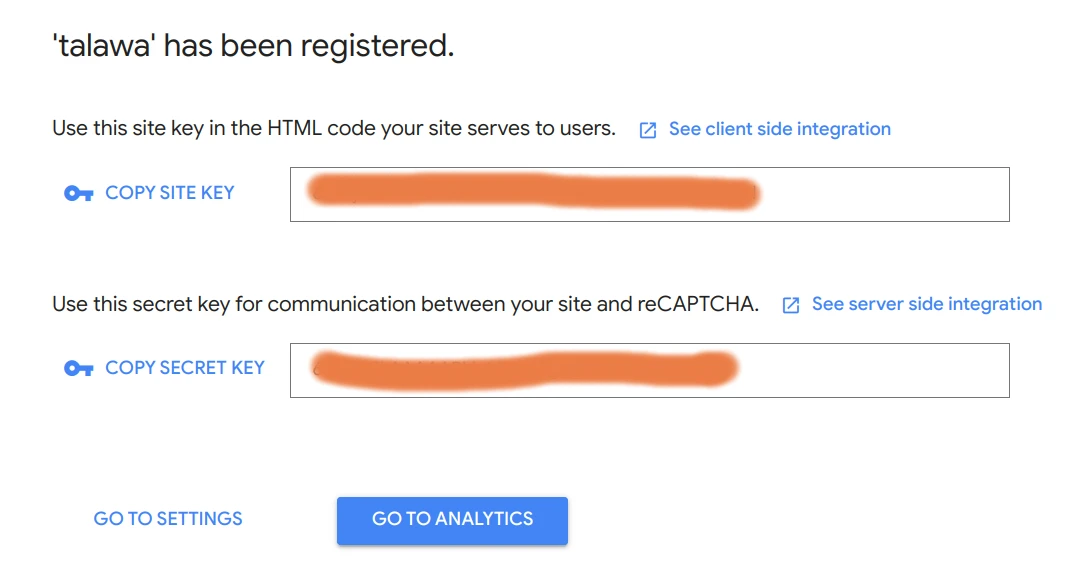
Copy/paste this reCAPTCHA site key to the variable named REACT_APP_RECAPTCHA_SITE_KEY in .env file.
REACT_APP_RECAPTCHA_SITE_KEY="this_is_the_recaptcha_key"
Setting up Compiletime and Runtime logs
Set the ALLOW_LOGS to "YES" if you want warnings , info and error messages in your console or leave it blank if you dont need them or want to keep the console clean
Verifying the Proxy Configuration
After setting up your .env file and starting the application, you should verify that the Reverse Proxy is correctly forwarding requests from the Admin Panel (Frontend) to the API (Backend).
Prerequisite: This proxy configuration requires BOTH the
talawa-admin(Frontend) andtalawa-api(Backend) projects to be set up and running simultaneously. The proxy cannot forward requests if the API server is offline.
1. Verify the Network Requests
The most reliable way to test the proxy is via the Browser's Developer Tools.
- Open your browser and navigate to the Admin Panel (e.g.,
http://localhost:4321). - Open Developer Tools (
F12orRight Click > Inspect) and go to the Network tab. - Filter the requests by
Fetch/XHRor search forgraphql. - Reload the page.
- Click on the
graphqlrequest and check the Headers tab.
| Check | Correct Value | Incorrect Value (Error) |
|---|---|---|
| Request URL | http://localhost:4321/graphql | http://localhost:4000/graphql |
| Status Code | 200 OK, 401 Unauthorized | 404 Not Found or Network Error |
Note: A 400 Bad Request is valid IF the response body contains a specific GraphQL error (e.g., "Cannot query field", "Validation error"). This means the proxy works, but the application code has a schema mismatch.
2. Troubleshooting Common Errors
If the connection fails, use this table to identify the cause based on the error message:
| Error Message | Probable Cause | Solution |
|---|---|---|
| CORS Error (Blocked by CORS policy) | The browser is bypassing the proxy and hitting the API directly. | 1. Check .env: Ensure REACT_APP_TALAWA_URL is set to the full backend URL (e.g., http://localhost:4000/graphql or http://192.168.x.x:4000/graphql).2. Verify vite.config.ts has changeOrigin: true in the proxy configuration.3. Restart the dev server after changing .env files. |
| "Unknown query" (400 Bad Request) | Proxy Issue. The Backend received the request, but the data payload arrived empty. | The proxy is incorrectly "dropping" the request body while forwarding it. Check your proxy middleware configuration in vite.config.ts. |
| "Cannot query field..." (400 Bad Request) | Success (Proxy Working). The backend received the query but rejected the syntax. | The proxy is working correctly. This is an application logic issue (e.g., database schema mismatch or a bug in the specific GraphQL query). |
| 500 Internal Server Error | The Backend crashed while processing the request. | Check the talawa-api logs for the stack trace. • Docker Compose: Run docker logs talawa-api-1 • Manual Start: Check the terminal window where you ran the server command. |
| "You must be authenticated..." | Success (Proxy Working). | The connection is successful, but the user is not logged in. |